Resolution management

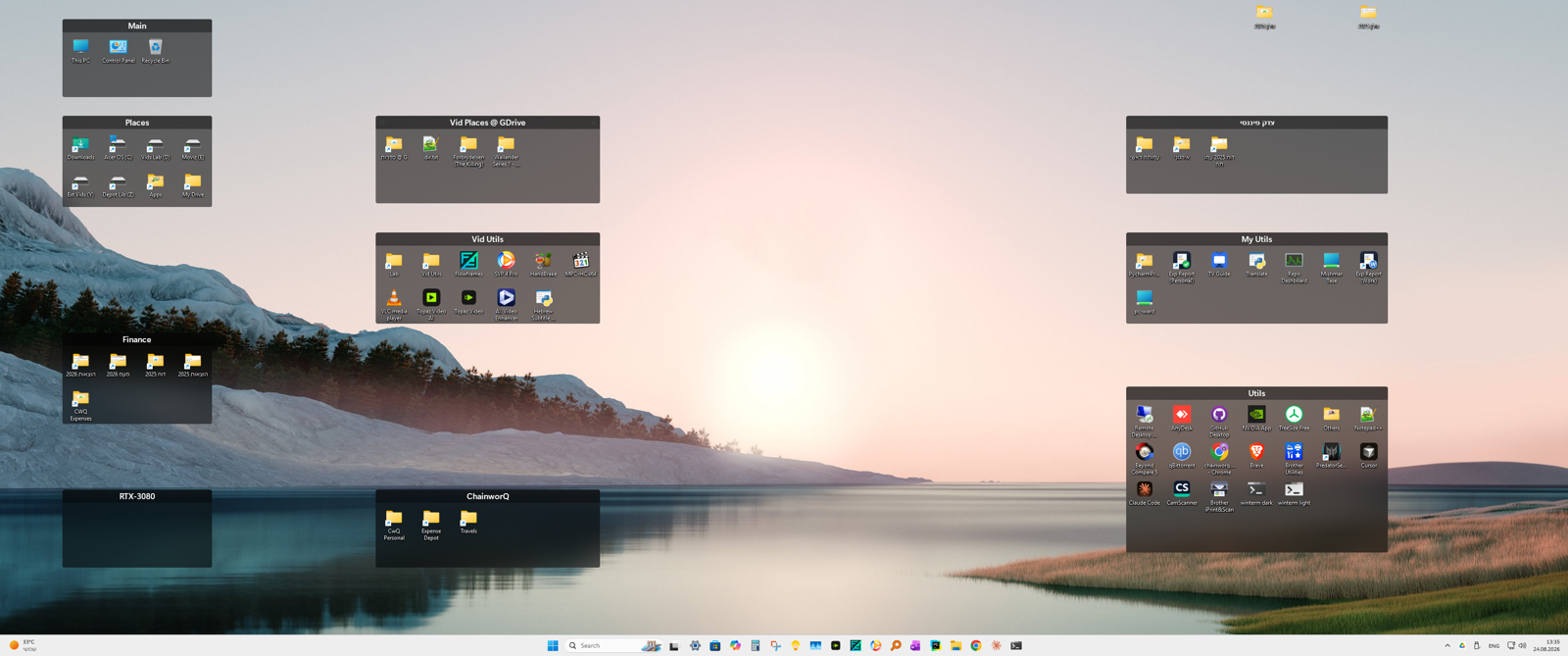
After 6 versions, many subversions, a few paid upgrades, .... I would expect that the very basic feature of keeping the setup per resolution will be polished for long. It is not.

Any cure? how many time i need to readjust my fences when moving between resolutions?


510 views 19 replies
Reply #1 Top

Hello,

Sorry to hear you are having issues. Actually, on Fences 6, from what I understand, it should manage your layout automatically. From what I know, Fences 6 keep track of your layout and resolutions. And, it should change your layout according to what you wish as you connect and un-connect your monitors. 

First to make sure Fences 6 was installed properly, Please uninstall Fences, reboot immediately (important), download latest Fences version available in your account product download page: https://store.stardock.com/myaccount/products. Install it, reboot immediately again. Retest it and report back. 

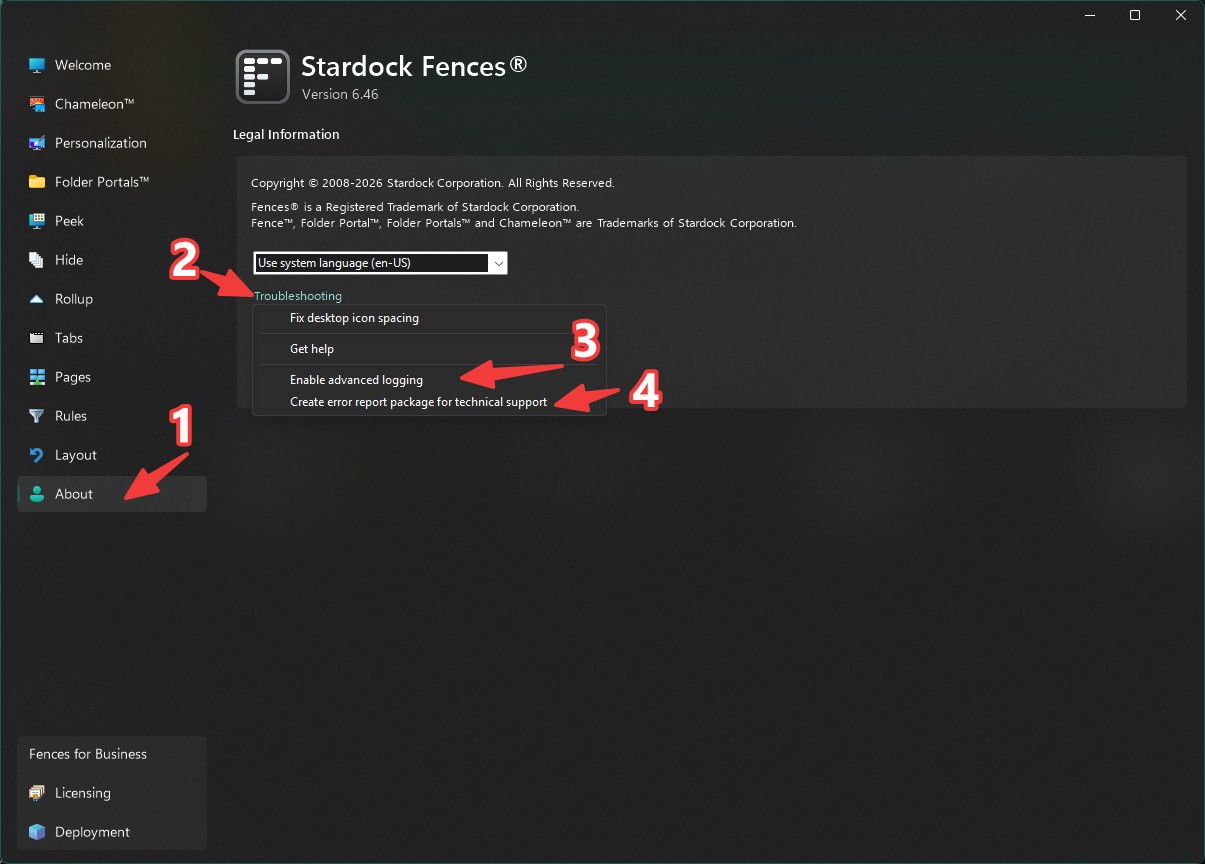
If the issue still appear, please turn on "Advance Logging", reboot the system. try to reproduce the issue and once it appear. Click on create error report package and send in for Support to review it. Remember to include this thread link in your report.

Thank you,

Basj,

Stardock Community  Assistant.

Reply #3 Top

The uninstall should not remove your setting, unless you choose to remove setting when you uninstall.

Thank you,

Basj,

Stardock Community  Assistant

Reply #4 Top

Hi - I'm not sure what you mean. Fences automatically adjusts to changes in resolutions. It is not doing this.


In v5 it was an option, but in v6 it's turned on for everyone. Let us know if it's not working correctly for you, as our intent is that it works for everyone.


Thank you

Reply #6 Top

Have you done the uninstall and reinstall steps? Does it still an issue? If so, have you send in your error report pack?

Thank you,

Basj,

Stardock Community  Assistant

Reply #8 Top

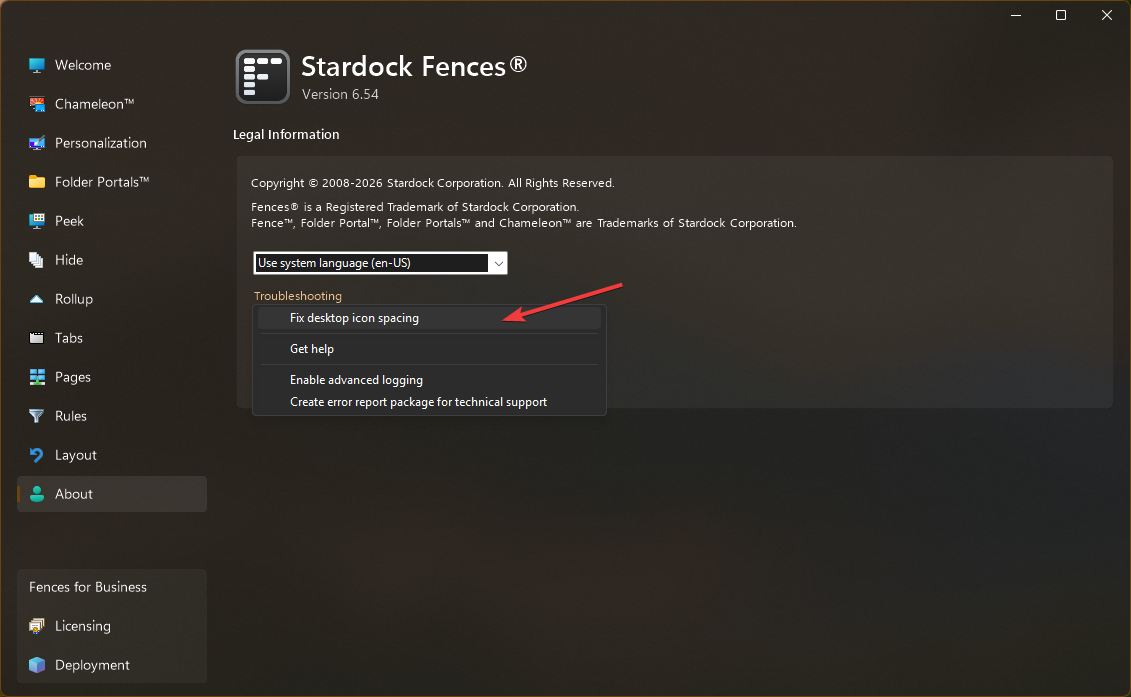
Hi. Please enable "Advanced logging" from the About → Troubleshooting menu, reboot (so that it takes effect), and then next time it occurrs please return to troubleshooting menu and select "Create error report". It will include necessary information.

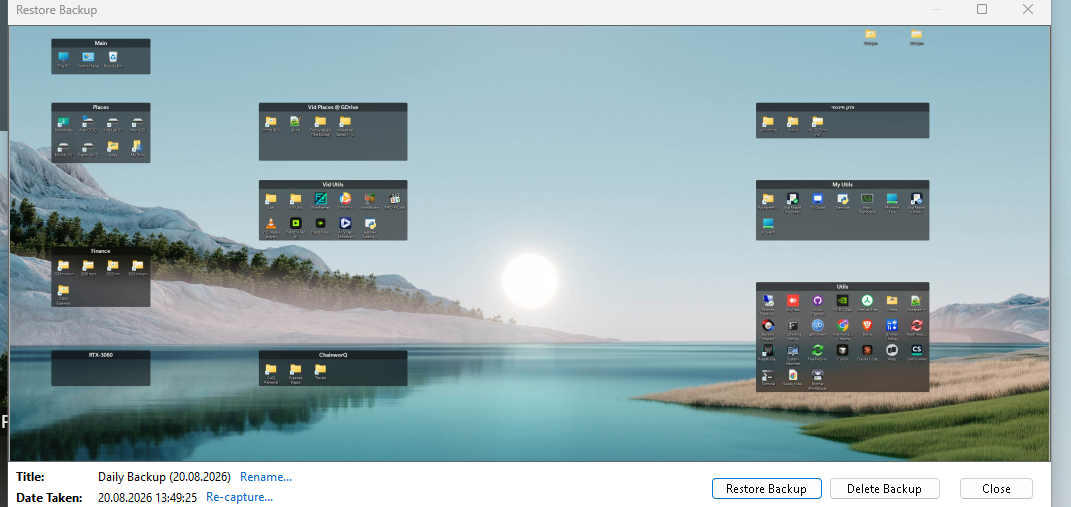
Take a snapshot backup in the Layout panel for "before" and "after" if possible to help the team track it down.

Reply #11 Top

When the spread out issue appear, try the "Fix Desktop Icon Spacing", does it help?

Thank you,

Basj,

Stardock Community  Assistant

Reply #13 Top

We’ll be having the dev team check it out soon- thanks for the detailed information

Reply #15 Top

Hi harel, team got to sit down with this together for an hour today and we are for sure seeing considerable thrashing between DPIs 150%/125%/100% on the system, but, it is not rapid, so, we were able to rule out "transient" problems.

Still looking into seeing what might be happening to have the groups remain stretched and if any problems there with the settings transformation between resolutions (i.e. the resolution change system, that stores the layouts separately per-DPI), but it does seem to just be an issue with the spacing detection itself that is stretching things out.

Specifically, when the system boots at 150% DPI and then moves to 100% DPI. Explorer handles this much differently than starting at 100% and then switching to 150% and then back to 100%. The basic logs go back to 8/4/2026, so, tbd if we can observe whether this began suddenly or not.

We do think we may have a solution, however. Please try editing this setting, and then hitting F5 on the desktop (and/or logging off and then on, if it doesn't seem to have effect.)

HKEY_CURRENT_USER\Software\Stardock\Fences\Settings
UseRealtimeIconSpacing=FFFFFFFE

New installations get "-2", upgrade installations get "-1". -1 applies improved sizing logic to "large desktop sizes" only, which were a known issue, and -2 applies to all icon sizes. The point of this was specifically so that the logic improvements would *not* propagate to existing installs where unneccesary, but, we're increasingly finding that we should probably propagate the improved mid-flight DPI-change spacing detection logic to all installs and all icon sizes, and further, trying to figure out if something changed that would affect existing installs outside of our intentions. In this case, your icon sizing is 39px, just below medium 48px.

Thanks for your patience, as as you might be able to see from the logs, very complex topic of transforming layouts and discerning system metrics.

Reply #16 Top

To that end, information on "this definitely didn't happen until very recently / before vX / ~date X" or "I vaguely recall this happening for a while" or "I don't recall" all useful pieces of info, if you recall! ty.

From the initial report, it sounds like this has been frustrating for a while.

Reply #17 Top

Well, let me list my frustrations:

1. Fences does not handle well on my computers resolution changes; e.g., using different screens (internal/ext home/ext work/rdp)

2. This particular stretched distortion appeared recently - weeks or so

3. I am not a code engineer - and cumbersome solutions that you suggest are not really solutions for me; for the 100% money I paid I expect the app to 100% without jugglings.


Reply #18 Top

Hi Harel. We're working to resolve the issue. This is the best we can do. You are receiving in-depth individual hands on engineering support. If you wish for a refund and purchased I believe within the last 6 months (payment processor limitation; depends on method used), we are happy to process one and I can put you in touch with support.

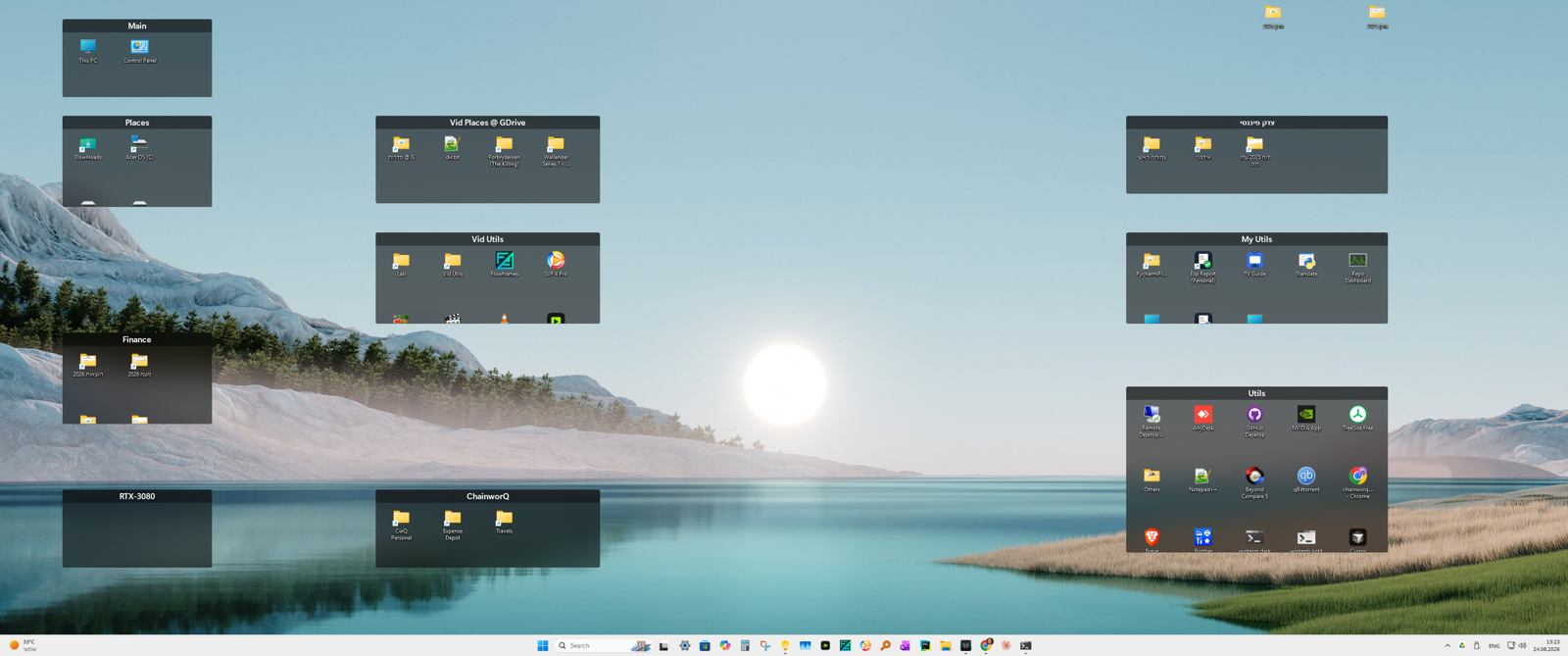
1. If you have issues with resolution changes, please indicate the problem. We have your log which shows switching between different screen resolutions, and it shows those configurations loading and saving appropriately/correctly, separate for each resolution. Screenshots are welcome to show issues with this. It seems like the issue you're experiencing might just be related to the scaling during DPI changes while changing resolutions.

2. You should be able to resolve the issue by using the "Fix desktop icon spacing" option and logging off then on.  Using it is likely to resolve your issue, without need to modify registry. Loading a backup will overwrite the changes, however, so if you're loading a backup, I'd do so after a fresh reboot. The issue mainly will occur after resolution changes, so if you startup the system and then do "Fix desktop icon spacing" before changing resolutions, they should not be negatively impacted. If you want to load a backup that has the incorrect setting and don't want its spacing to be messed with upon future loads of the backup, start the system, load the backup, choose "Fix desktop icon spacing" and then retake the snapshot.

If using "fix desktop icon spacing" does not fix the issue, we'll be getting you an updated build this week; please submit an updated log (it will contain more information). If you do not wish to do this then we can supply a refund. We think this however will resolve the issue.

Reply #19 Top

Harel, we have an updated copy available, which should address your spacing issue without neither the need to do the "fix desktop icon spacing" method above nor the need to edit registry. Please see the updated version here: https://forums.stardock.com/r?u=https%3A%2F%2Fstardock.cachefly.net%2Fsoftware%2FFences%2FFences6%2FFences6_6.5.6.2-j140-Setup.exe and please let us know if this helps or doesn't help.

In the event there are continued spacing issues or if you have other resolution-change issues, we can work with you to further look into your report.

For sake of reference, if your groups got overly stretched out during a resolution change, they'll stay that way until the next time you fix them, but, they should be addressed after that for subsequent switches in and out of monitor configurations. As noted we looked and saw the program did seem to be correctly storing and retrieving different layouts per monitor configuration.