Hello,
Sorry to hear you are having issues. Actually, on Fences 6, from what I understand, it should manage your layout automatically. From what I know, Fences 6 keep track of your layout and resolutions. And, it should change your layout according to what you wish as you connect and un-connect your monitors.
First to make sure Fences 6 was installed properly, Please uninstall Fences, reboot immediately (important), download latest Fences version available in your account product download page: https://store.stardock.com/myaccount/products. Install it, reboot immediately again. Retest it and report back.
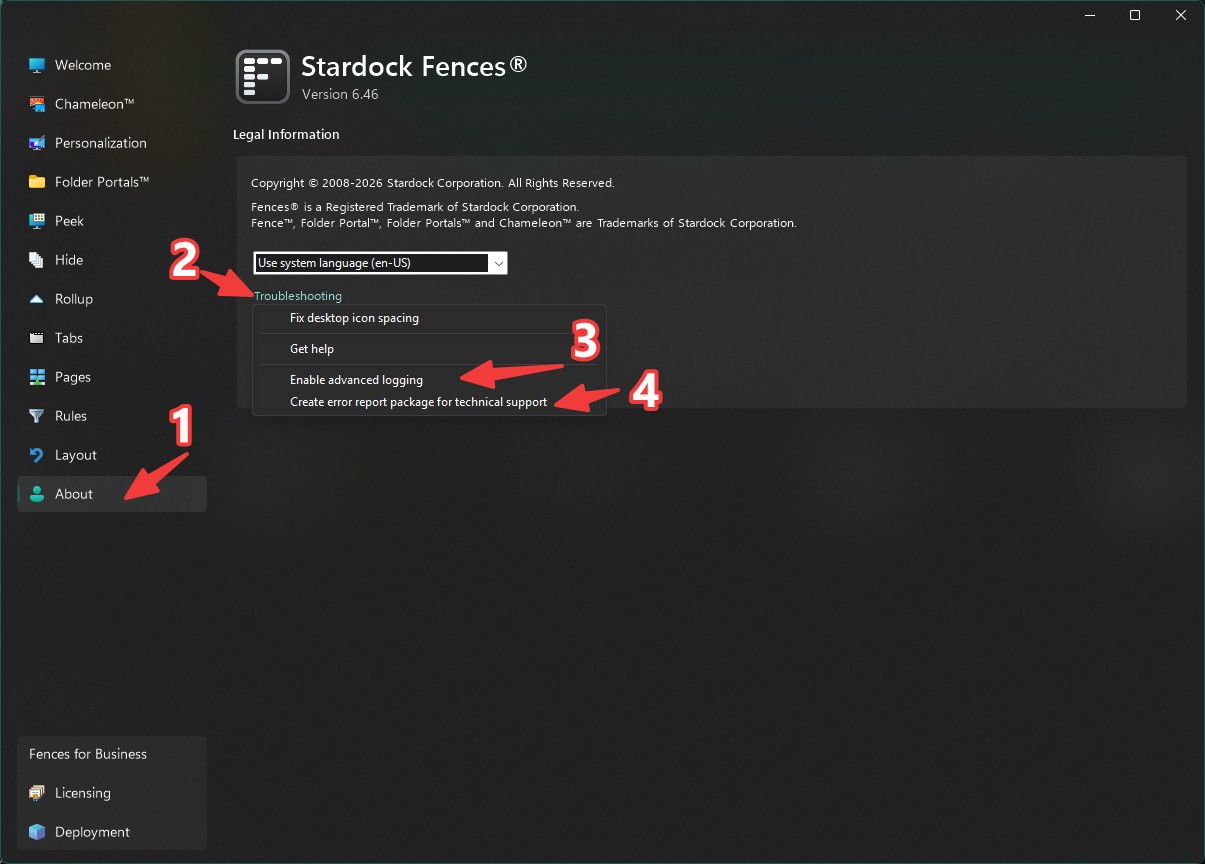
If the issue still appear, please turn on "Advance Logging", reboot the system. try to reproduce the issue and once it appear. Click on create error report package and send in for Support to review it. Remember to include this thread link in your report.
Thank you,
Basj,
Stardock Community Assistant.


 Stardock Forums