Crash to desktop on starting new map

Ok, I'm not sure what to do next. Every time I try to start a new game with more than 10 or so factions I crash to desktop. I've tried deleting the game from steam and re downloading it as well as deleting the folders from "my games" with no change. After a crash I will verify game files through steam and 3 failed to validate and are downloaded. Check again and all good right? Nope, 12 factions and crash as the map is setting up. check again and three files failed to validate. Is there anyway to tell which files these might be? I recently moved my steam library to a separate SSD but all of my other games are doing fine. I have some steam workshop content, mostly factions but no mods and they aren't enabled anyway. I'm not sure where to go from here.

Specs: core i5 8600, GTX1070ti, 16Gb ram

19,530 views 13 replies
Reply #1 Top

Hello,

Sorry to hear you are having trouble.

Every time I try to start a new game with more than 10 or so factions I crash to desktop.

So if you have 9 factions its fine?  Are you picking them at random or in order of the ones you see?  I ask as I want to see if its qty or one of the factions in particular.

Sean Drohan
Stardock Support Manager

Reply #2 Top

Thanks for the quick response. Working from that idea I just did some trouble shooting. Playing as Terran on huge map with everything rare I was able to load 13 races, however it seems that when I add the drath it crashes. On a hunch I tried with korath and CTD again. 2 files failed to validate. At the moment I'm assuming that there is something going on with the latest expansion and have removed it and am downloading it again. Lets see if this works.

Reply #3 Top

Quoting brokenflint, reply 2

2 files failed to validate.

Just so you know, that is expected (will happen everytime) and not the cause of the issue - it has to do with how Steam works.

Looking forward to your results.

Sean Drohan
Stardock Support Manager


Reply #4 Top

I've re downloaded the last expansion and the problem persists. Same settings with only Drath and Korath as opponents this time and CTD. Any suggestions on what to try?

Reply #5 Top

Quoting brokenflint, reply 4

I've re downloaded the last expansion and the problem persists. Same settings with only Drath and Korath as opponents this time and CTD. Any suggestions on what to try?

I dont show any crash submissions (a popup when the game crashes) from your ******flint@gmail.com address.  Are you submitting them under a different email address?

Also, are you running the Opt-in or general release:

Does it happen under both?

At the very least, please upload your:

\Documents\My Games\GC3Crusade\debug.err

To a cloud service (GoogleDrive, OneDrive, DropBox, PasteBin) and post a shared link here.

Sean Drohan
Stardock Support Manager


Reply #6 Top

I think at some point a while ago I must have disabled the error reporting checkbox when messing with mods. I was running the NONE setting but I just tried under the 3.8 preview and it still crashed. Here is the debug.err from before. 

https://drive.google.com/file/d/18fAt1hK2GHb6aT3X2LdDFd_K1mXvtMEG/view?usp=sharing

Reply #7 Top

Quoting brokenflint, reply 6

I think at some point a while ago I must have disabled the error reporting checkbox when messing with mods. I was running the NONE setting but I just tried under the 3.8 preview and it still crashed. Here is the debug.err from before. 

https://drive.google.com/file/d/18fAt1hK2GHb6aT3X2LdDFd_K1mXvtMEG/view?usp=sharing

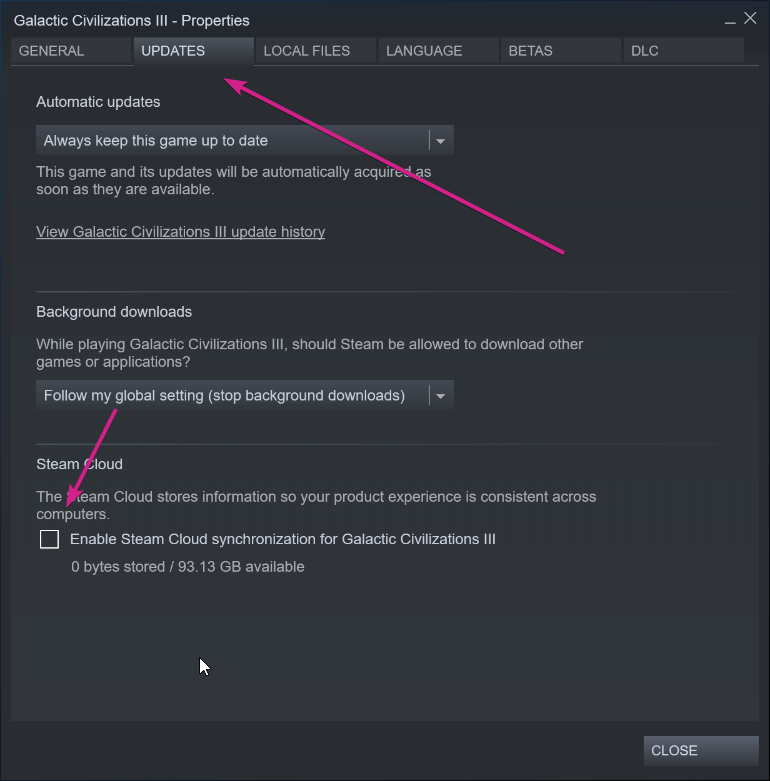
First, turn of Steam sync for the game for the time being:

I would like you to rename:

C:\Users\sdrohan\Documents\My Games\GC3Crusade

to:

C:\Users\sdrohan\Documents\My Games\GC3Crusade.OLD

Try running the game thereafter (a new GC3Crusade folder will be created).

Sean Drohan
Stardock Support Manager

Reply #9 Top

Quoting brokenflint, reply 6

I think at some point a while ago I must have disabled the error reporting checkbox when messing with mods.

Go to:

\Program Files (x86)\Steam\steamapps\common\Galactic Civilizations III (or where you have it installed).

With Notepad, open: SDCR64.ini

If HideUI = something

make it:

HideUI =

Blank.

Save it and see if you get the crash reporter then.

Reply #10 Top

I was getting the same thing. CTD when starting a new map. For me, it was the Mu'Kay. Once I removed them, I was able to start the game without crashing.

Reply #11 Top

I think I fixed my problem, although I don't know how.

First off, Hide UI in that file was already blank but the crash reporting wasn't coming up. I deleted it and let steam replace it. Still no dice. I have a working copy of my game on my laptop so I figured I'd try and replace it with that copy, while I was at it I just copied the entire Gal Civ 3 Directory, because why not? Now all races seem to load. Immense map with all default races doing fine.

Even though I uninstalled and re downloaded through steam before all this I'm thinking that something wasn't removed/replaced correctly. Thanks for the support Rohan.  Good luck impinc.

Reply #12 Top

Quoting brokenflint, reply 11

Thanks for the support Rohan.

You are most welcome and glad it worked out for you.

Incidentally, to get the crash popup again, I found that you need to go here in the registry:

Computer\HKEY_CURRENT_USER\Software\Stardock\Crashlog

And delete the 'DoNotPromptAboutCrashes' key:

Sean Drohan
Stardock Support Manager

Reply #13 Top

Quoting sdRohan, reply 12


Quoting brokenflint,

Thanks for the support Rohan.


You are most welcome and glad it worked out for you.

Incidentally, to get the crash popup again, I found that you need to go here in the registry:

Computer\HKEY_CURRENT_USER\Software\Stardock\Crashlog

And delete the 'DoNotPromptAboutCrashes' key:

Reduced 86%
Original 973 x 139


Sean Drohan
Stardock Support Manager

It worked for me too. Thank you so much