Designing Thoughts

First off, I like it.  I played with the ones that came with it to see what could be done, and I think it's a wonderful start.

I started on a game to learn my way around and found a few things that were confusing, and a couple that maybe might be possible additions.

I know this is alpha so I suspect that there a lot of things to be added, but I was looking for some simple props that are flames, or torches, along with other maybe some tables, chairs, more things to decorate areas with. 

When trying to start off a game with a char waking up and not knowing where they were, I added some triggers to spawn a dialog, which worked fine, except there was no option to tell it to do it only once.  So a single use switch that is activated by stepping on it would be nice, or maybe a parameter to specify how many times to do it.  I could also see a parameter for a number of times before it triggers.  Also the trigger arrow to the dialog works, but it doesn't actually show that it worked.  I thought maybe I was doing something wrong, but it did work.  I was expecting that the trigger would show in the edit what it was connected to, but it doesn't seem to.  I could see that becoming more of an annoyance when a lot of triggers are around and you forget which one goes to which items

Another thing that would be nice is the ability to not show areas that are behind walls until the char moves into that area. Think more in terms of rooms.  There is the hidden area like in one of the games and I'm seeing how that works.

I'll update with more once I try more things.


16,027 views 15 replies
Reply #1 Top

I think to do the "Waking up and display dialogue" part requires you to use the "Trigger area" gadget, which you then set the dialogue as the target. I'm also doing something similar, and this has worked for me.

I tend to place my dialogue blocks way off screen since I don't like them showing the sparkle indicator when I do that.

Also keep in mind that every time you go into edit mode, it resets all triggers (they mention this in the adventure tutorial, I believe), so your dialogue won't actually play twice when playing normally. (I think?)

Reply #2 Top

no, it will display each time you walk over it.  I do have my dialogs off to the side, and the idea I'd like is to have the first dialog have triggers in a square around the char, as they walk out they would get the first, then the 2nd then the 3rd.  So it really needs to show only once.

I'm pretty sure that the events will get more abilities as they figure out how they want to add them, and to what.  Just putting in what I'd like.

Reply #3 Top

Thanks for the feedback, Mist!

I was expecting that the trigger would show in the edit what it was connected to, but it doesn't seem to. 
End of quote


it will display each time you walk over it.  I do have my dialogs off to the side, and the idea I'd like is to have the first dialog have triggers in a square around the char, as they walk out they would get the first, then the 2nd then the 3rd.  So it really needs to show only once.
End of quote


If you get a moment, could you send the game with these dialog issues to scott@stardock.com? I'd like to investigate, and the easiest way is to just dig into the game itself :)

(Game XML is stored in Documents/My Games/TheVideoGameMachine/GeneratedGames)

Reply #5 Top

I'm sorry Mist, the email came through but for some reason the attachment was stripped.

Would you mind uploading the game to the arcade for me to look at, or perhaps trying my scotttykoski@gmail.com account?

Thanks!

Reply #6 Top

Ok, I sent it to both, zipped this time...and with a simple password to hopefully convince whatever stripped it to ignore it.

Reply #7 Top

Perfect! Thanks Mist - got your file and I think I have a solution.

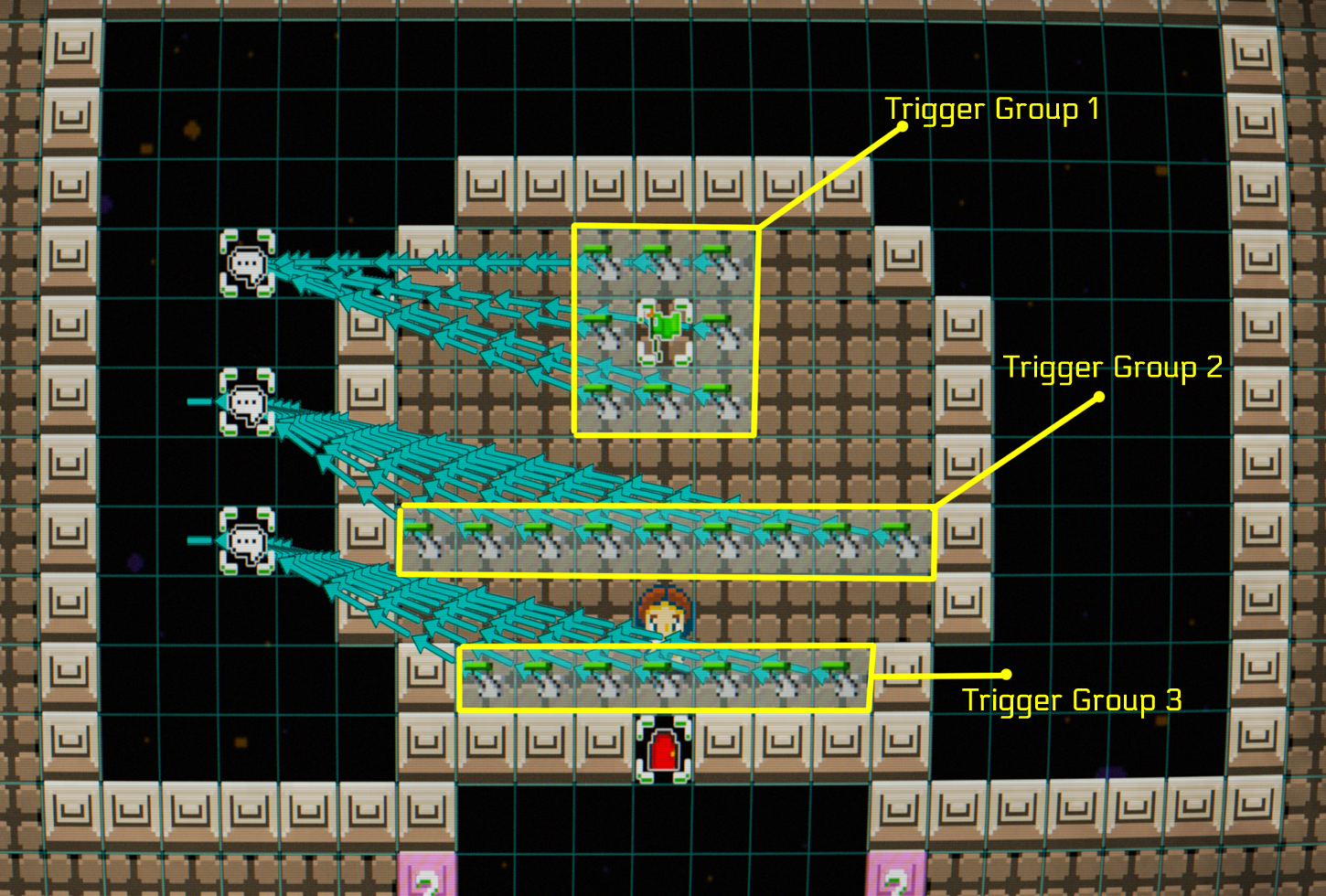
Because 'Trigger Areas' use Adjacency to to determine what gizmos are part of that group, you have to have a 1 tile separation between triggers you want to activate sequentially.

With this layout, Group 1 gets fired. Then you walk down and fire off Group 2. Then group 3.

We need to explain this to the player, but hopefully this helps!

Reply #8 Top

That reminds me, I want to suggest that we can define our own groups (if that's not already possible). Due to limited space and the inability to stack gizmos, real estate is going to be sparse, and there may be necessary to put groups directly next to each other. :) 

Reply #9 Top

ok, that makes sense.  Easy enough to adjust.  Would still like  play once option for the dialog though..:D


Reply #10 Top

Ok, I see how it is working with the trigger, I still don't get the green arrows to the dialog. I just need to adjust it so I only need 1 trigger and let them hit them in order.  I can work with that.

Reply #11 Top

Quoting Silver-Streak, reply 8

That reminds me, I want to suggest that we can define our own groups
End of Silver-Streak's quote


Haha The team and I had JUST been talking about grouping about 2 hours before you posted this :)  There are lots of ways to do this, but finding the most user-friendly one is the challenge. We'll keep discussing, but feel free to post ideas here. Now that you've played around with VGM, how would you suggest implementing Grouping options (in a way that works for gizmos, enemy flocks, tiles, etc)?


Quoting Mist_Dragon, reply 10

I just need to adjust it so I only need 1 trigger and let them hit them in order.
End of Mist_Dragon's quote


Yeah, sounds like you'd just delete Trigger Groups 2 & 3, then have the Dialog 1 target Dialog 2, then Dialog 2 -> Dialog 3. Please let me know if you have any more questions!

Oh, and is your handle from Final Fantasy 4? Big fan of that game & was curious :)

Reply #12 Top

No, I don't think I've played ff4, I've played, 1/2/5/6/7/8/9/10/12/13.1/14 (still play this one)/15...so I am pretty much a ff fan.

One thing I was thinking about, not sure if it is in the planning.   But I was thinking about dialogs and if there was going to be a way of having chained dialogs?  Basically the ability to have the char have a small conversation with an npc.  Maybe even a label on the dialog to indicate who is speaking.

Reply #13 Top

Yes - right now the dialog system is only exposing a small fraction of what's possible. Eventually the player will be able to write out dialog trees with branching outcomes and such, but we first we need to got the basics hammered out :)

Reply #14 Top

Excellent.  Looking forward to it.  Till then I'll keep messing with it.


Reply #15 Top

Quoting ScottTykoski, reply 11

Quoting Silver-Streak,


That reminds me, I want to suggest that we can define our own groups


Haha The team and I had JUST been talking about grouping about 2 hours before you posted this :)   There are lots of ways to do this, but finding the most user-friendly one is the challenge. We'll keep discussing, but feel free to post ideas here. Now that you've played around with VGM, how would you suggest implementing Grouping options (in a way that works for gizmos, enemy flocks, tiles, etc)?

End of ScottTykoski's quote


So I'm of a few minds on this:

  • If you want to keep it fully point and click: add a tool to the gadget window called "Grouping tool", which lets you click and drag to select multiple gizmos/objects (like in a RTS to select multiple units). Then it can pop up an option of "assign group" where you can select a group number 1-100?
  • If you don't mind a little keyboard interaction: Holding down shift should let you click and drag a box to select multiple gizmos. Then after selecting multiple (like an RTS) you could press shift+#key to assign group 0-9.
  • Probably more work, but might be cleaner for newer users: To any gizmos that work in an area (mostly the attack/area/etc triggers), add an option in the edit screen of "assign to group" and have it work like you do with the gate gizmo's exit/entrance naming functionality.