Cannot Activate, Freezes

Hi, I have received your email and downloaded the Video Game Machine. However, whenever I'm starting, the program hangs (error AppHangXProcB1), I get a blank screen, nothing is loading and I am unable to activate my product - pressing "Enter Product Key" does nothing. I am unable to proceed beyond this.

15,313 views 9 replies
Reply #1 Top

Have you tried redownloading and reinstalling to ensure there were no errors with the download or installation?

Reply #2 Top

Hi,

Yes, I have already done that. The installation was pretty straightforward and there were no errors.
Is there another way to activate? Or am I pretty much stuck till the next version / update?


Reply #3 Top

Quoting Kr0zBoNE, reply 2

Hi,

Yes, I have already done that. The installation was pretty straightforward and there were no errors.
Is there another way to activate? Or am I pretty much stuck till the next version / update?


End of Kr0zBoNE's quote

I will consult with the devs once they’re up. We should be able to get this resolved today or tomorrow.

Reply #4 Top

Hello,

Sorry to hear you are having trouble.

pressing "Enter Product Key" does nothing.
End of quote

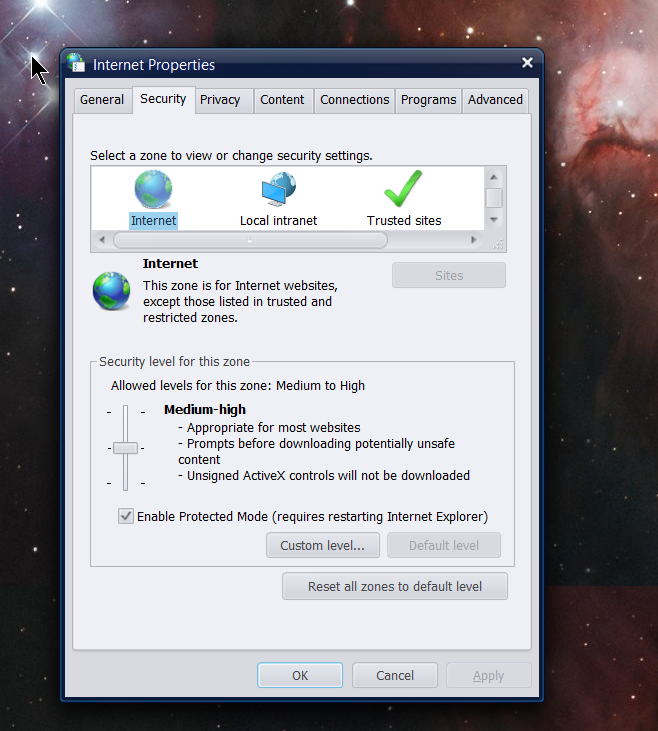
As odd as it might sound, that activation window uses components of Internet Explorer.

I want you to open up Internet Explorer, go to Internet options, and set everything to 'default' (primarily the 'Security' and 'Advanced' tab).

Click OK and try to see if the 'Enter Product Key' button responds.

Let us know and thanks for the patience and patronage.

----------------
Sean Drohan
Stardock Customer Service Manager 

Reply #5 Top

Hey, thanks for your reply! I do not use IE, and have it disabled.

The security settings were not touched at all. I also only use Firefox and Chrome. 

So, before I try that, I would like to know, is it possible to do it using my main browsers instead.
Don't really want to compromise anything.

Reply #6 Top

Quoting Kr0zBoNE, reply 5

So, before I try that, I would like to know, is it possible to do it using my main browsers instead.
Don't really want to compromise anything.
End of Kr0zBoNE's quote

Hmm, you could Win10 search 'Internet Options' and get to it I suppose:

----------------
Sean Drohan
Stardock Customer Service Manager

Reply #7 Top

Hi, 

Unfortunately, it is still not working for me.
I've also tried running it in admin mode.

Reply #8 Top

Kr0zBoNE,

I would like to ask you to create a new Windows Admin (<--important) account and try to activate under it.  If it succeeds there, it should work (be activated) on your main account as well thereafter.

Let us know and thanks for your patience. 

----------------
Sean Drohan
Stardock Customer Service Manager

Reply #9 Top

Hi Sean,

Thanks for your suggestion. However, I don't think I will do that, as I am already the primary admin... 

The time in between our messages, I have already done the following:
1) Reinstalling
2) Disabling AV / Firewall
3) Defrag (I do regular com maintenance, so this is no different)
4) Run as admin
5) Set compatibility mode

Still not working for me. Probably, I will wait for a newer version / updates of VGM and try again. 

Thanks to you and the mod team for the help so far.
Looking forward to using it in the future.