logitech solar keyboard?

has anyone tried one of those? k750.


tempted by the solar bit as flipping batteries is a bit of a pain. but not certain how reliable the recharging business is.

81,512 views 15 replies
Reply #1 Top

I have 2 of them.. One my brother uses for his desktop and has had no problems with even though its not in a well lit area though he does not tend to use the computer all that much.


I however am a power users and use the keyboard for 5+ hours a day on average at least and I have gone through 2 keyboards where they both worked fine fine for about a month and then it just seems to break down. The charging and discharging rate goes haywire and it cant hold a charge for very long.. even putting the keyboard in the sun for 2 days resulted in 1% increase as it seemed the keyboard would go into a 'sleep' mode and stop charging after the 1st 5 min in the sun. I had to end up using the keyboard with a lamp focused on it and well that didnt work out to well.. Logitech replaced the keyboard but the issue popped up again.. I couldnt be bothered returning it a second time and have given up on it for my own needs.


All said though the one my brother is using is still going strong so either i got unlucky twice or my really heavy use seems to stuff up something on the keyboard, I noticed with the first one it seemed the left ctrl key would seems to be held down even though it looked normal. So maybe its a manufacturing defect that shows up with heavy use.


Hope that helps!

Reply #2 Top

that sounds a bit like the problems i read in their forum.... guess i better wait a few years till they optimise the way it would work.


thanks!

Reply #3 Top

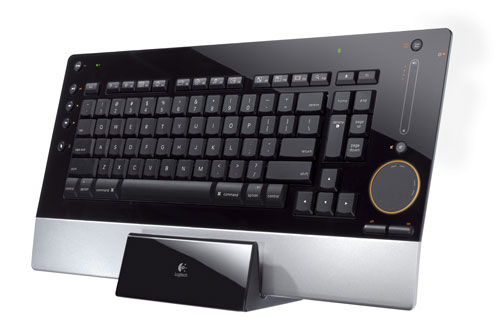
Logitech DiNovo Edge .... not solar...but built-in battery and 'charging station'....lasts a few weeks of CONSTANT use...then dock it while you sleep.

Been running for just on 3 weeks [since the MotoGP] and tray icon still says battery 'fair'...which means a few more days yet...;)

Not cheap...but build quality/function is unrivalled.

Reply #4 Top

<---on its charging station.

Reply #5 Top

OK...I won't do that again....

Logitech diNovo Edge Mac

<--- on its charging station.

Reply #6 Top

tempted by the solar bit as flipping batteries is a bit of a pain.
End of quote


this one's terrific.... no batteries... just usb charging.... and lasts a long time between charges...can charge while using.... 

laser-etched backlit keys with sensor is a great feature...  quiet and beautiful feel to type on.....worth a look....  ;)   link


Reply #7 Top

interesting.. think the edge does things i don't need (vol control, for example) and i sort of like number pads (and a bit steep too...) XD

k800 probably best bet if i change mouse too. something to think about.

of course... just need to find a pile of gold or rob a bank....


thing about keyboards is that i don't need all those "internet" buttons or extras. just need something solid and hassle free (ie.. cordless, etc)


the charging thing for k800 is only via usb, ie whilst the machine is powered on? or is it via some sort of charging station like the old revolution mx mouse?


---

mind you... why would solar recharge be worse than "mains" recharge in terms of lifespan of the battery?!

Reply #8 Top

Quoting alaknebs, reply 7
the charging thing for k800 is only via usb, ie whilst the machine is powered on? or is it via some sort of charging station
End of alaknebs's quote

no charging station.....straight into the 'puter...  lasts for ages...

Reply #9 Top

Yeah, I was thinking about picking this one up for my Mac.  I like the wireless/solar idea and the fact it has a keypad is a bonus.

http://www.logitech.com/en-us/keyboards/keyboard/devices/8424?WT.ac=ps|8604


Reply #10 Top

The DiNovo Edge is very stylish and i like it. Had a Logitech Wireless Illuminated Keyboard K800 to test for a week and i must say that one is also very stylish and thin it has realy good touch to it and the key´s are extremely good. It has a usb kabel that u can plug and recharge + while recharging continue using the keyboard until its loaded up again thats the coolest part. I think highly of Logitech products the price is good and the quality is ok + they last long.


Reply #11 Top

Quoting sydneysiders, reply 8
no charging station.....straight into the 'puter... lasts for ages...
End of sydneysiders's quote

but does it only charge when the computer is switched on, or does it also do its thing whilst it's off but connected to the mains? (unlikely as it would be)


for the mouse with something that sounds similar, it looks like it has a plug to mains to charge

http://www.logitech.com/mice-pointers/mice/devices/5845

which was why i was wondering if it has something similar...


unless it's literally just the bag with mains charger sold separately...

---

logitech's weak point for me was drivers i think. but their customer service was quite good. had a revolution mx die on me (something borked with the recharge? or was it mouse button), they sent me a replacement.. (which had a dud recharge XD), then sent me another.


then again, i quite like the microsoft mice i had too... felt it was a bit more solid.

Reply #12 Top

Quoting Roloccolor, reply 10
The DiNovo Edge is very stylish and i like it.
End of Roloccolor's quote

....and it has 'bling' .... groovy lighting effects on the mousepad...and volume slider.

Main thing is...it's mechanically perfect....a proper 'feel' to the buttons....;)

Reply #13 Top

new recommendation for you....  o_O


customise your keyboard... :omg:


"The hallmark of the Optimus Maximus is that its software lets you customize the image on each tiny display. The default layout provides a standard alphanumeric layout, but through the downloadable configuration software you can change the color, font, and size of the letters. You can alter the background color, you can type words, reassign commands, and even tie image and video files to display on individual keys, or across multiple keys.

Open up an image-editing program through the configurator and you can draw freehand over an image of the keyboard layout. Whatever you care to draw on top of that layout will appear on the keyboard as soon as you save your new file".


what an amazing way to waste more time...     :|

Reply #14 Top

I want to make tasteless keyboard layout - nice

Reply #15 Top

Oh yes, I would love to get my hands on a keyboard like the Optimus Maximus.  The thing is, I'm not sure that having uniformly-sized keys is the way to go for the best typing experience.  I've become a fond fan of the Microsoft Comfort Curve 2000 keyboard, and it has keys which are larger than standard square keys.