BIOSHOCK

I have Bioshock for the PC. There is a BIG problem with mouse lag that makes the game unplayable for me. I have searched the internet and tried various methods to correct but to no avail. Has anyone out there had the same problem and fixed it? If so, could you tell me how!
105,670 views 26 replies
Reply #1 Top
Ok, a few questions, DX9 or DX10? Vista or XP? Security Updates installed along with service packs? Updated Video Drivers? Display Settings in Bioshock ie: specific settings? Audio drivers up to date? You really didn't give any relevent information to your issue, aside that your having mouse lag issues which could be caused by a number of issues. Glad to help, but need more info.
Reply #2 Top
run the game in dx9 mode, and as an administrator! made a huge difference to me, i ran this on my laptop! not as pretty as dx10 but it runs stable like that. Good luck! many people have issues with this game crashing at the menu on dx10 mode.
Reply #3 Top
big lag are often caused by slow system. pls post ur system specs and the graphic settings in Bioshock u use
Reply #4 Top
big lag are often caused by slow system. pls post ur system specs and the graphic settings in Bioshock u use


Vista OS. 2.74 dual core processor. 4 gigs ram. 258 mb ATI x/1300 x/1550 card (current drivers). My rig is pretty beefy, its not that kinds lag

I've dome some research into this and it seems to be a known issue due to the game being a 'Port'. I'm not sure what that means or how it affects the game or my comp.

I have tried some solutions where you adjust the 'X' and 'Y' numbers and that helped a bit but there is still some lag. It sucks when use move the mouse and then a split second later your cursor moves. I am curious if this has happened to anybody else in the same manner.

Reply #5 Top
Port means that the game was originally designed for another system and has been adapted for the one it was ported to.
Reply #6 Top
your videocard is crap...
May I suggest updating to a HD 4870 rather cheap for the ammount of power you get now
Reply #7 Top
I'll agree that your vid card may be a bit underpowered. I also had the same problem, I game with a Razer Diamondback mouse, when I turned my (razer app.) sensitivity down to 5, then the in-game sensitivity down to 1... all was well.
Reply #8 Top
May I suggest updating to a HD 4870 rather cheap for the ammount of power you get now


I game with a Razer Diamondback mouse,


1. HD 4780 - who make it? mb? cost?

2. Razor mouse - is it good? when u made those adjustments did the slight delay in reaction time go away completely?
Reply #9 Top
The 4870 is an ATI card. Several companies make it. It runs around 300 bucks right now (you'll want to make sure your power supply can support it, btw).
Reply #10 Top
The 4870 is an ATI card. Several companies make it. It runs around 300 bucks right now (you'll want to make sure your power supply can support it, btw).


I am quite the newb when it comes to comp hardware. How do you check to make sure the power supply can handle it?
Reply #11 Top
How many watts is you power supply rated? This is only a general indicator. The biggest concern is the amps on the 12 volt rail. If you can find out the brand and model of your PSU [power supply unit] (you should be able to just open your case and look at the sticker on the PSU), it would help.
Reply #12 Top
Yeah, as has been said, your video card is pretty old. Plus you said "258 mb ATI x/1300 x/1550 card (current drivers)". The 1300 is an entirely different card from a 1555, so that's a little confusing, but it doesn't matter.

As far as the PSU you will need to actually look at it. On the side is a chart that shows the total watts of the psu along with the amps for each rail (I'll explain that in a moment).

It'll look something like this:
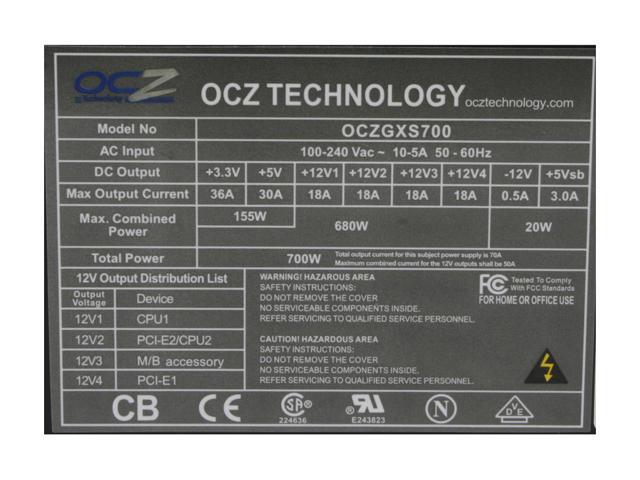


The important parts are the max watts or total power. In the above image it has 700 watts. I'd guess you're gonna be somewhere in the 350-500 watt range.

For picking out a video card, the 12v+ rails are important. In the above picture, there are 4 12v+ rails rated at 18amps a piece, for a rough total of 72 amps. The newer cards generally need at least 26amps of power. So, if you have two 12v+ rails of 12amps a piece you can get most cards, but definitely do some research to determine how much power a card needs beforehand.

And upgrading to a 4870 (which is ATI, btw), while a fantastic card, is probably too big of a step. That's a brand new card and runs for just under $300. I would highly recommend picking up a new card with 512mb vram for newer games. 256mb is just not enough anymore.

Sorry for the long post. Let us know what kind of power you have and we can make some suggestions.

Oh, and far as mouse lag goes, it could be the videocard. Try turning the visual settings down.
Reply #13 Top
Sorry for the long post. Let us know what kind of power you have and we can make some suggestions.

Oh, and far as mouse lag goes, it could be the videocard. Try turning the visual settings down.


Long posts are good!. I like learning this stuff.
I'll check out my power supply when I get home.
I've tried turning down the settings..........nope.
Reply #14 Top
Well, over at TweakGuides, Koresh has a couple of settings you can change in the Bioshock.ini file for mouse lag issues. It never hurts to read the entire guide (you can find it here), but page 7 is where he has a couple tweaks for your specific problem.

Koresh does recommend turning v-sync off in the in-game settings. You should try that first.

Of the recommended changes, this one seems the most pertinent. And I quote:

"CaptureMouse=True

This setting controls the way mouse movement is recorded by the game, and in general you won't gain anything by altering it. However for people who experience mouse lag, setting this option to False may help. See the In-Game Settings section for a discussion of mouse lag and fixes."

So, in the Bioshock.ini file (which you should backup before changing anything) change the CaptureMouse to read False. Save the file. Boot up the game and give it a try.

Like I said, read through the entire guide. His guides for optimizing Windows can really help general performance.
Reply #15 Top
Like I said, read through the entire guide. His guides for optimizing Windows can really help general performance.


Thanks for the article!!!!

This part:
"Mouse Lag: If you are experiencing 'mouse lag', that is a feeling of reduced sensitivity or sluggishness in your mouse, regardless of how high you set the mouse sensitivity slider, you should first make sure you are consistently getting sufficient FPS, especially in more complex scenes such as during combat. Use FRAPS to check your FPS, and keep in mind that typically anything below 20-15FPS will bring about mouse lag in any game, so you will have to lower your settings appropriately to prevent this as much as possible. Importantly, make sure to disable VSync as not only is it know to cause mouse lag, it also reduces performance which can make mouse lag even worse. If these steps don't help to reduce mouse lag, see the ReduceMouseLag, DoubleBufferMouseLag and CaptureMouse variables in the Advanced Tweaking section."

I believe I have read and tried these options a few months back but I will try again in case I did it incorrectly. I know I altered 'X' and 'Y' axis numbers and it helped....but not all the way.

I have a birthday coming up in a few weeks.....a new video card is in my future I think. Any suggestions anyone for cards in the $200 range that won't be outdated in 6 months?

Reply #16 Top
Nvidia's 8800 GT or 9600's.
Reply #17 Top
^^Agreed.

The 4850 is probably the best price/performance ratio (after the 4870), but the 8800gt's have dropped down in price since the latest series of cards were released. You can get them (after a mail in rebate) for $130. The Radeon HD 4850's are about $50 more.

Whatever you do, don't go to a store like BestBuy and buy a video card from them. They're waaaaaay overpriced. NewEgg is the way to go.

And anything you buy will be outdated in a month. There's no way around it. Technically, Nvidia's 8 series are two generations behind, so they're effectively outdated, but they're still the cards that most people have. They're damn good cards.
Reply #18 Top
The 4850 is probably the best price/performance ratio (after the 4870), but the 8800gt's have dropped down in price since the latest series of cards were released.


Which one of the ones you mentioned is better? The price really doesn't matter.

A better question. Which video card out there is the best right now and compatible with most games, operating systems, DirectX 10, etc. I think I want that one!
Reply #19 Top
Good man. Lol.

We still need to know the specs on your power supply. The new cards like to use energy.
Reply #20 Top
I'll post them tonight when I'm done at work.
Reply #21 Top
I will post my stuff for the power supply........I'm sorry, I know I said I would post it after work. My wife is 6 months pregnant with our first child (a boy....named Nicholas) and I have no free time at the moment at home. I actually have been posting at work.....its slow right now.

Thanx for all help!

Anybody out there play chess at all, online?
Reply #22 Top
Congrats!

No worries about not posting when you said you would. It isn't the end of the world or anything. :P

And no, I don't play chess online. I am terrible at chess when I don't have the board in front of me. I just don't see the pieces all that well.
Reply #23 Top
Razor mouse - is it good? when u made those adjustments did the slight delay in reaction time go away completely?


The delay became hardly noticeable, but things still felt a little off, not enough to diminish a truly amazing game.

I LOVE my Razor... BUT, I'm having an issue, a failing that I guess is quite common: Every now and again I get a disconnect/reconnect, on mine it seems to be a problem with where the cord meets the mouse, probably a bad connection. I'll replace it soon, and if I don't get a Diamondback, it'll have to be a good mouse with two extra thumb/pinky buttons on each side... I'm completely dependent on them now.

Reply #24 Top
I'm completely dependent on them now.

Have you considered rehab?
Reply #25 Top

Quoting Kitkun, reply 24
Have you considered rehab?

Yeah, but with all the booze and injecting heroin into my tear ducts, I couldn't find the phonebook... so I gave up.