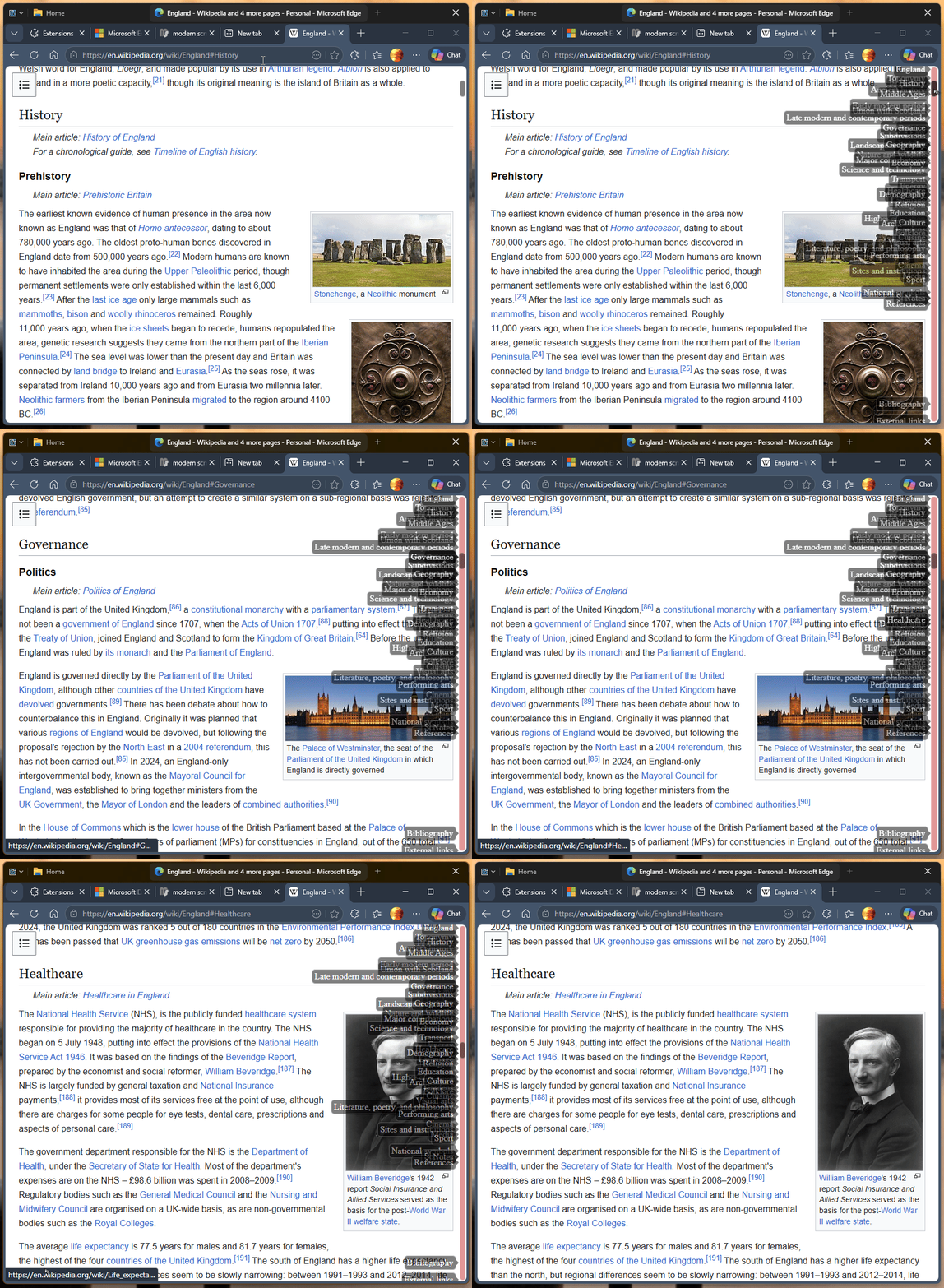
Groupy 2.31 breaks Modern Scroll extension buttons in Chrome / Edge

Confirmed compatibility issue: Modern Scroll works when Chrome/Edge are excluded from Groupy

https://github.com/Christoph142/modern-scroll/issues/237

Hello Stardock / Groupy team,

I would like to report a compatibility issue between Groupy 2.31 and the Chromium browser extension “Modern Scroll”.

Modern Scroll adds custom scrollbars and scroll buttons to Chrome browser [147.0.7727.138 (Official Build) (64-bit)]
It happens as well in Edge browser so it is a Chromium issue.

When Chrome is managed by Groupy 2, the Modern Scroll scroll buttons stop functioning correctly.

I first reported this to the Modern Scroll developer because I initially thought it was a Modern Scroll issue.
That report includes screenshots of the behaviour: https://github.com/Christoph142/modern-scroll/issues/237

The Modern Scroll issue was closed.
After further testing, I can now confirm that the problem appears to be caused by Groupy 2.

Confirmed behaviour
When Groupy 2 is enabled for Chrome:

* Modern Scroll’s scroll buttons are visible.
* The buttons react visually when clicked.
* However, the webpage itself does not scroll.

For example, on a long webpage such as a Wikipedia article:
* clicking the top scroll button can briefly light up the greyed-out bottom button;
* clicking the bottom scroll button can briefly light up the greyed-out top button;
* this reaction can happen in sync with the click frequency;
* but the page does not move.

This happens in both Google Chrome and Microsoft Edge.

Important confirmation
When Groupy 2 is disabled, Modern Scroll works normally again.
When Chrome and/or Microsoft Edge are excluded from Groupy 2, Modern Scroll also works normally again.

So the issue appears specifically connected to Groupy 2 interacting with Chrome / Edge windows.

Environment
* Windows 11 Home 24H2
* Groupy version: 2.31
* Google Chrome: Version 147.0.7727.138 (Official Build) (64-bit)
* Microsoft Edge: Version 137.0.3296.52, 64-bit (not tested recently)
* Modern Scroll in Chrome: 4.3.1
* Modern Scroll in Edge: 4.3.0

Steps to reproduce
1. Run Groupy 2.31 on Windows 11.
2. Allow Groupy 2 to manage Chrome or Microsoft Edge.
3. Enable the Modern Scroll extension.
4. Open a long webpage, such as a long Wikipedia article.
5. Click the Modern Scroll top/bottom scroll buttons.
6. Observe that the buttons visually react, but the webpage does not scroll.
7. Disable Groupy 2, or exclude Chrome / Edge from Groupy 2.
8. Observe that Modern Scroll works normally again.

Expected result
Clicking the Modern Scroll buttons should scroll the webpage up or down.

Actual result
The Modern Scroll buttons react visually, but the webpage does not move when Chrome / Edge is managed by Groupy 2.

Possible cause
My non-technical guess is that Groupy 2 may be intercepting, wrapping, or altering something in the browser window or input handling, which prevents Modern Scroll’s button-click scroll action from reaching the page correctly.

Could Stardock please investigate whether Groupy 2.31 can interfere with Chromium browser extensions that create custom scroll UI elements?

It would be helpful to know whether there is:
* a Groupy setting that can avoid this issue;
* an exclusion rule or workaround for Chrome / Edge;
* or a possible bug fix in a future Groupy 2 update.

Thank you.
 
517 views 8 replies
Reply #1 Top

Hello,
Sorry to hear you are having issues. I tried it by, I could not see the issue. I grouped Edge with File explorer. And, I still can click on those scroll buttons to quickly move to specific point in the webpage, yes. 

Perhaps, I misunderstood the issue, please post a video showing the issue. It will help us understand it better.

Thank you,
Basj,
Stardock Community Assistant.

Reply #2 Top

Hi Basi,

Thank you for following up so swiftly.
You understood the issue well.
I have had it on every laptop with Groupy installed and now that I setting up a new rig it popped up again.

How to add an image to this post was obvious but I didn't see how to insert a video clip so I made it available via DropBox:
https://www.dropbox.com/scl/fi/umgqxvw7dnmcad9194cza/Screen-Recording-2026-04-29-193431.mp4?rlkey=g6mq18d3vsq0suqi2gem5onof&st=j9d6d07z&dl=0

The clip shows on a few grouped webpages that when Chrome is managed by Groupy 2.31, the Modern Scroll buttons react visually, but the webpage does not scroll. When one clicks on the Modern Scroll top button the one of the bottom blinks and visa versa. The buttons react visually, but there is no scrolling.

When Chrome is excluded from Groupy, or when Groupy is disabled, Modern Scroll works normally again.
So, on my system, the issue appears to be directly connected to Chrome being managed by Groupy.


Please let me know if there is another preferred way to provide the video recording.

Have a nice day.


Reply #3 Top

In my system I don't see the top and bottom semi circle to click on, how do I get those to appear? Perhaps, I am missing a setting.

Thank you,

Basj,
Stardock Community Assistant

Reply #4 Top

Ha, "Modern Scroll" offers enhancement of the scrollbars next to  these "half circles" (I call them "buttons") on top and below the webpage. Those buttons are for jumping with one click to the end of start of a webpage.

To activate the scroll buttons:
(1) Right-click the "Modern Scroll" extension icon.
(2) Scroll down the Settings list to "Scroll buttons"
(3) "Activate" these "jump scroll buttons" by making them visible.

So, it's not the scroll bars (altered by "Modern Scroll") that are impaired on my system when the browser window is enhanced by "Groupy 2", but it are these "jump buttons", provided by "Modern Scroll", that no longer function as expected. In stead of jumping to top or bottom of a webpage a click on the top "Button" lights up the bottom "Button" but there is no scrolling.

It is kind of a luxury problem but it would be nice if at some point a solution would come available. 

Have a nice weekend.


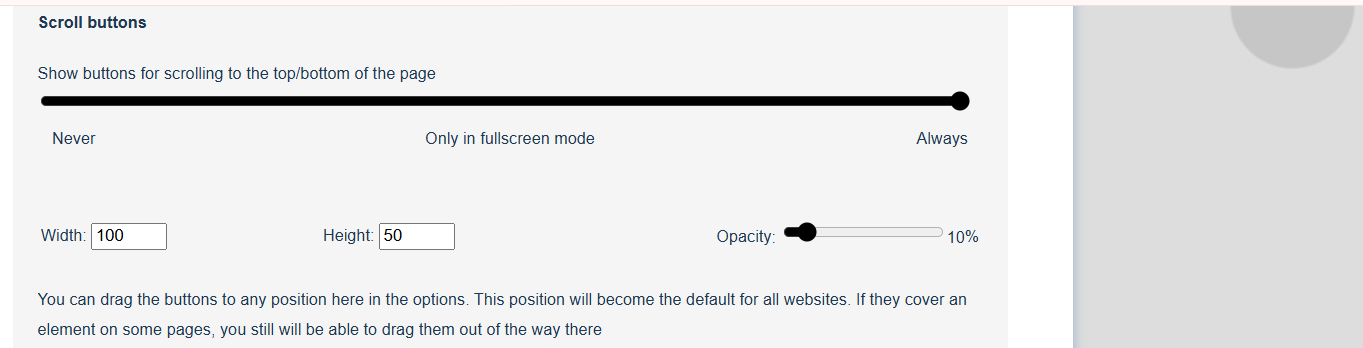
A screenshot from the "Modern Scroll" Settings.
On the edge of the image on the right is the somewhat greyed out "jump button"
Clicking that greyed out button should let the user "jump" to the top of the screen. It is that function that seems impaired.

Reply #5 Top

Okay I get the top and bottom button to appear, but what is it support to do? I click on the top button if move the page to the top or the page and click on the bottom one, bring the page to the end. The same behavior with Groupy turn on or off. What is the correct behavior for these two button? Perhaps post a video showing what it should do without Groupy turn on?

Thank you,

Basj,
Stardock Community Assistant

Reply #6 Top

This is a video, as requested, showing what the normal functioning of the buttons is of a Chrome window not part of any Group:
https://www.dropbox.com/scl/fi/z2uu53pye7jofy30ypvmt/Modern-Scroll-vs-Groupy2.mp4?rlkey=0x6dhnzsyjxyq0epj7pg7p5ld&st=xdfb43p2&dl=0

Unlike in the previous video where Chrome had been grouped with Groupy2 in this ungrouped browser window the "jump buttons" of "Modern scroll" are fully functional: button on the bottom jumps to the end of the page; button on the top: jump to the top of the page.

On every PC I have had Group2 installed in combination with "Modern Scroll" the "jump buttons" "Modern Scroll" offers get impaired the moment the browser window is made part of a group using "Groupy2" functionality.

Reply #7 Top

I can't reproduce your issue on my system. However, I have forwarded your problem/question to Stardock Support Team for their assistance. Please keep an eye on this thread for any updates. We appreciate your feedback and patience. Thank you.

Basj,
Stardock Community Assistant

Reply #8 Top

I bookmarked this discussion.
Not sure what is so different about the systems I have been running over the years on different computers from what other PC users run but indeed I was the one to report this issue first to the GitHub entry of "Modern Scroll" and next, when there seemed a correlation with "Group2", here.

It's a luxury problem and if I come across more news about it I'll follow up here.

Thank you for all your time and efforts.